For Saudi contracting companies

Construction ERP, from site to cash

Enter a number once. BillBrick carries it from the certificate to the ZATCA invoice, the client’s cash and your subcontractors’ payments.

Worked example · fictional figures · SAR

One certificate, from site to cash

  1. Certify
    1,000,000entered once
  2. InvoiceVAT 15% on the gross. ZATCA: Cleared
    1,150,000+150,000 VAT
  3. Retention10% held from the amount payable — never from the taxable amount
    −100,000payable 1,050,000
  4. Collect
    630,000linked to its certificate
  5. Pay subcontractorsTheir 40% of the work, paid out at the same rate the client pays the invoice — never automatically on certification
    219,130180,870 waits for cash
  6. Release retentionOne ledger per contract; released at Practical Completion and end of DLP
    100,000held

You entered one number. Every other figure was derived from it.

  • Built for ZATCA Phase 2Fatoora e-invoicing: B2B clearance, B2C reporting
  • Your server, your dataOn-premises or private cloud — data stays on your company’s server
  • Bilingual tax invoicesArabic and English PDF with QR code and your logo
  • Every approval on recordTen roles; each approval named and timed

Where the money gets stuck

Certificates on spreadsheets. Invoices somewhere else. Subcontractors on email.

Numbers that never reconcile

Certified, invoiced and cash received never agree.

Retention lost track of

The real balance is unknown until the DLP ends.

Subcontractors paid at the wrong time

Paid before the client pays — or chasing payments already due.

ZATCA as a manual last step

A manual, error-prone step at the end.

BillBrick keeps it in one chain: each number entered once.

Dashboard

The whole portfolio, live

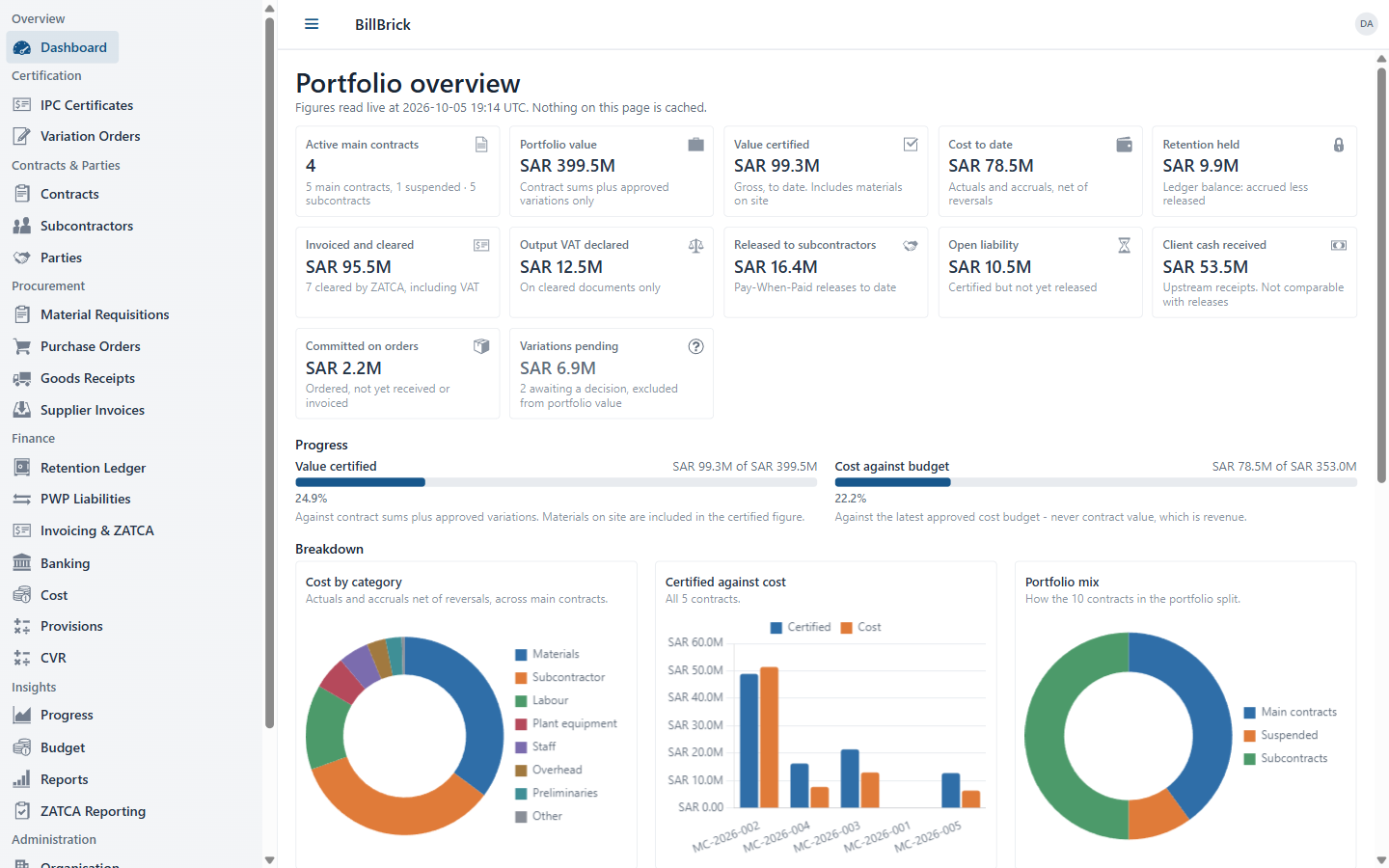
BillBrick portfolio overview with figures, progress bars and charts
  1. Value certified, cost and retention — live

    Calculated from your records on every visit. Nothing typed in twice.

  2. From invoice to subcontractor

    Invoiced and cleared by ZATCA, VAT declared, and released to subcontractors.

  3. Cost against budget, not contract value

    Measured against the budget your commercial manager sets — every revision recorded with its reason.

  4. Where the money goes

    Cost by category, certified against cost, and your whole portfolio mix.

  5. One chain, from certificate to cash

    Certification, contracts, procurement and finance in one system.

Payment certificates (IPC)

Next month’s certificate, one click from this month’s

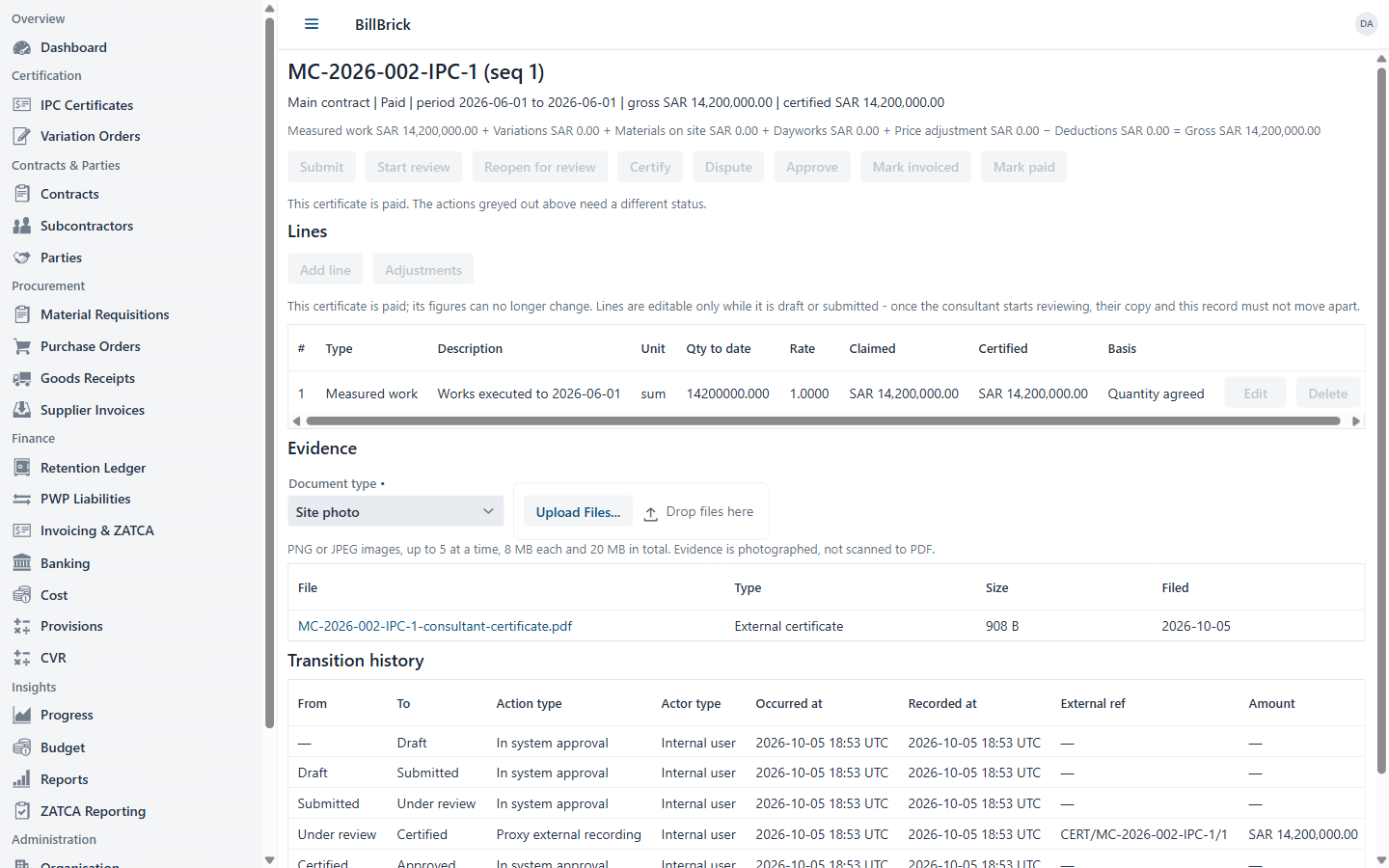
BillBrick payment certificate with valuation build-up, lines, evidence and transition history
  1. The valuation, built up

    Measured work, variations, materials on site and dayworks — cumulative, so “this period” calculates itself.

  2. Submit, review, certify, approve

    A client certificate turns Invoiced when its tax invoice is cleared — and Paid when the client pays in full.

  3. Certify line by line

    Part-certify any line, with the reason on record. Next month copies the lines in one click.

  4. Evidence on every certificate

    Photos, daywork sheets and the consultant’s certificate — attached where they belong.

  5. Every move on record

    Every status change with who and when. After submission, every line change is logged — before and after.

E-invoicing

Built for ZATCA Phase 2 (Fatoora) e-invoicing

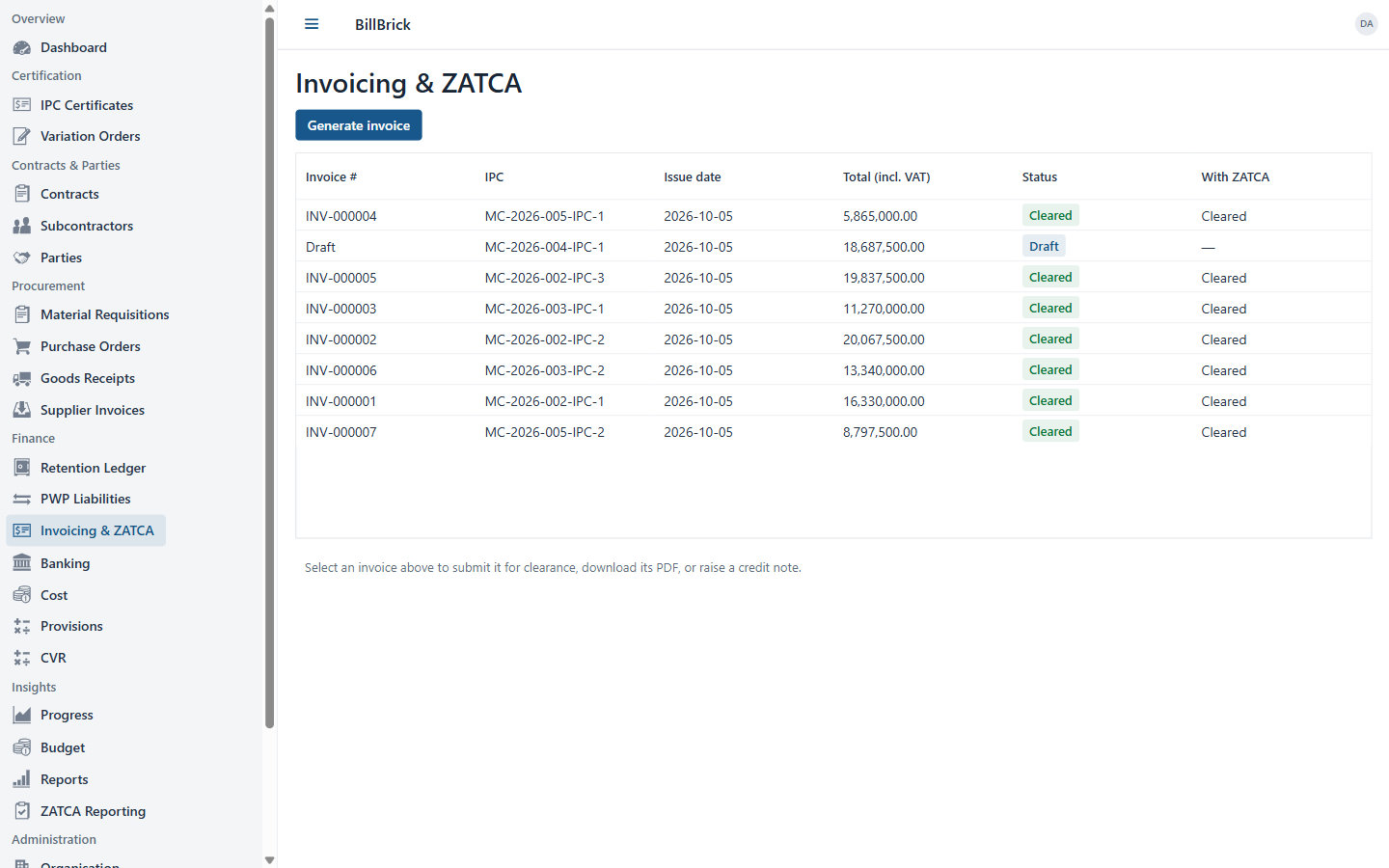
BillBrick tax invoices with their ZATCA clearance status
  1. From approved certificate to tax invoice

    UBL 2.1 XML, XAdES signature, QR code and hash chain.

  2. Clearance and reporting

    B2B invoices go for clearance, B2C invoices are reported — each marked Cleared or Reported.

  3. VAT on the gross, retention off the payable

    VAT 15% on the gross; retention never reduces the taxable amount.

Pay-When-Paid

Pay subcontractors from the client’s cash — not before

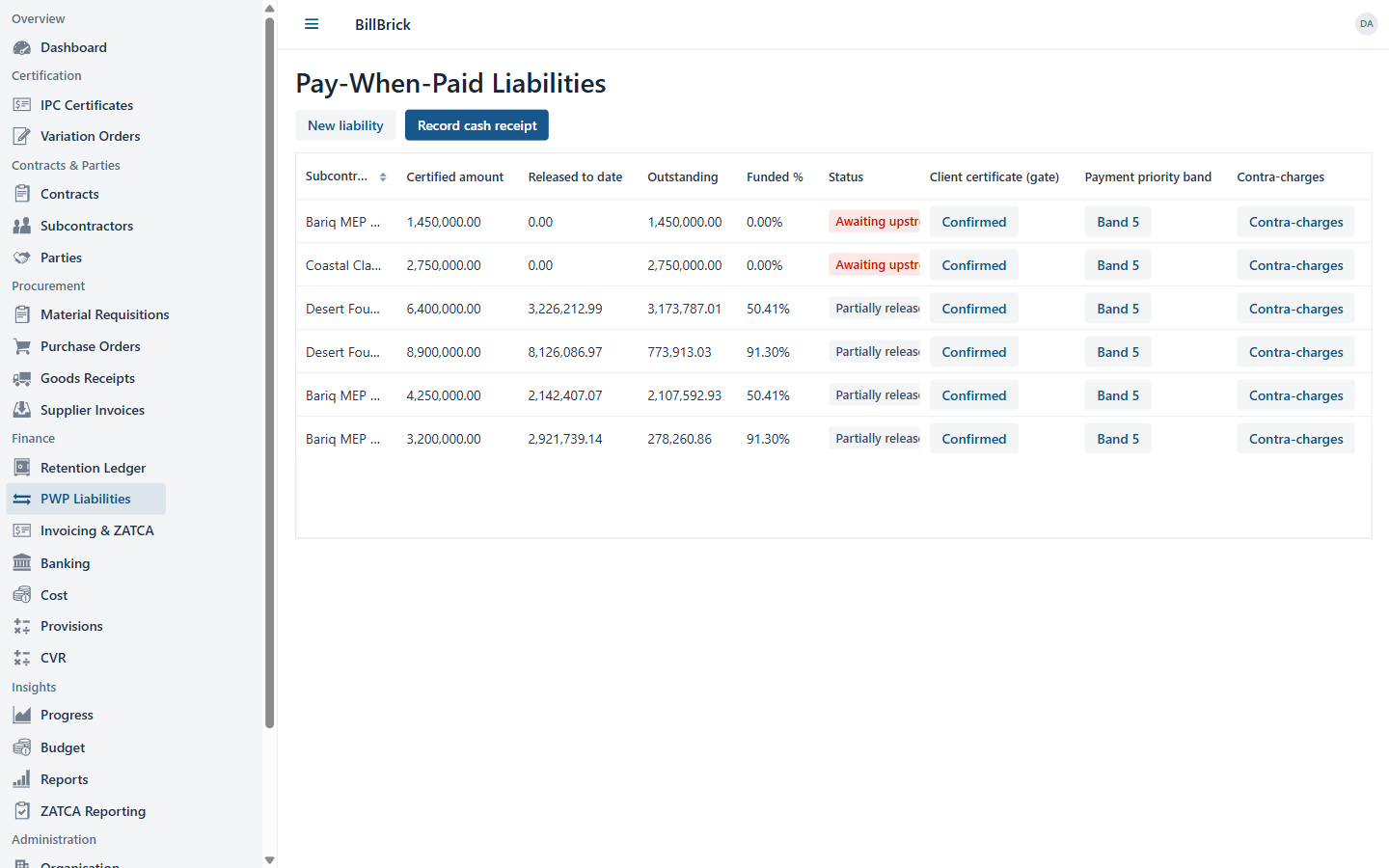
BillBrick Pay-When-Paid liabilities: certified, released, outstanding, funded percentage and funding certificate
  1. A liability the moment it is certified

    Created automatically: certified, released, outstanding and funded %.

  2. Funded by a client certificate

    BillBrick proposes it, your commercial manager confirms it. Nothing is released before that.

  3. Released as the cash lands

    The client pays 60% of the invoice: every subcontractor’s 60% becomes payable. Never released automatically on certification.

  4. Back-charges and priorities

    Six kinds of contra-charge, and a payment priority on every liability (1 = pay first).

On site

Works in the phone browser

Nothing to install. Building your own site app? The offline-ready API syncs measurements, photos and goods receipts when the connection returns.

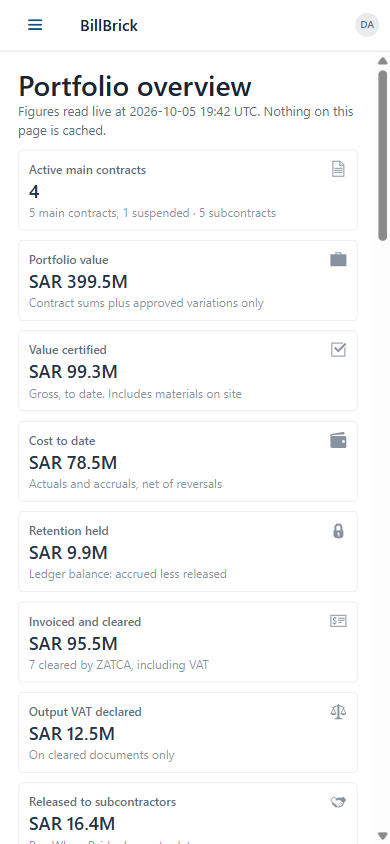
BillBrick portfolio overview on a phone screen
  1. In the phone browser

    Tested at 375 to 390 pixels wide.

  2. The same live figures

    Certified, cost, retention and invoiced — card by card.

Retention your client holds

Know your retention to the riyal

  • Deducted on every certificate, at your contract’s rate
  • Stops at the cap, set on contract value plus approved variations
  • Half released at Practical Completion, the rest at the end of the DLP
  • One ledger per contract: held, released and room left under the cap
Balance
500,000
Deducted
500,000
Released
0
Retention ledger, latest entries
EntryRetentionBalance
Certificate 4+120,000360,000
Certificate 5+120,000480,000
Certificate 6+20,000 · cap500,000

Example: SAR 10,000,000 contract · 10% per certificate · cap 5% of contract value · 50% released at Practical Completion

Seen enough to talk?

Tell us about your projects. We will call you to arrange a demo.

Request a call

Also in BillBrick

The controls behind the numbers

Procurement

Four-eyes on every order

Whoever raises an order can’t issue it. An invoice that doesn’t match its order and receipt waits for the commercial manager.

  1. Requisition
  2. Purchase order
  3. Goods receipt
  4. Supplier invoice
  • Three-way match
  • Four-eyes approval
  • Split across contracts by %

Variations

Pending never inflates the contract

Approved only with the client’s approval document, reference and date.

  • Approved updates the contract sum
  • Pending shown separately

Security

Ten roles, every approval named

Everyone sees only what their role allows — on screen and on the server. Every approval carries a name and a time.

  • QS
  • Commercial Manager
  • Project Manager
  • Finance AR clerk
  • AP clerk
  • Finance Manager
  • Procurement Officer
  • Site Engineer
  • Subcontractor PM
  • System Administrator

Cost, budget and CVR

Cost against budget, not revenue

Budgets per category, every revision with a reason. Accruals, committed cost and CVR snapshots each period.

  • Materials
  • Labour
  • Plant
  • Subcontractor
  • Preliminaries
  • Staff
  • Overhead
  • Other

Banking

Every receipt tied to its certificate

Bank receipts and payments carry the bank’s reference — and link to the client payment they prove.

Contracts

Main contracts and subcontracts

Clients, consultants and suppliers with VAT number and national address.

Notifications

The right person, at the right step

17 workflow emails, sent from your company’s own mail server.

A certificate is waiting for your approval

Also included

  • Optional single sign-on (OpenID Connect)
  • Sign-in rate limiting
  • Encrypted ZATCA keys
  • Your logo on your tax invoices
  • Aging, CVR and variation reports

Delivery

Installed for one company

One Docker image and a PostgreSQL database — on a Linux server, or Windows 10/11 for smaller set-ups.

On-premises

Your data stays on your own server.

Private cloud

In your private cloud.

Hosted by us

We host it for you.

Questions contractors ask

What is BillBrick?

BillBrick is construction ERP for Saudi contracting companies. It runs the commercial side of a project: from the measured work on site, through the consultant’s payment certificate and the ZATCA tax invoice, to the client’s cash and the subcontractors’ payments.

Who is BillBrick for?

Main contractors and specialist contractors in Saudi Arabia. Quantity Surveyors, Commercial Managers, Project Managers, Finance, Procurement, Site Engineers and the System Administrator use it every day.

What does the dashboard show?

Contract value, value certified, cost, retention held, invoiced and cleared, VAT declared, cash received, released to subcontractors, open liability, commitments and pending variations. Value certified is shown against contract value plus approved variations; cost against the cost budget, never against contract value.

How is a payment certificate built?

Line by line: measured work, variations, materials on site, dayworks, price adjustment and deductions. Amounts are cumulative, so “this period” is always derived. Lines can be partly certified with a recorded reason, and next month’s certificate copies them in one click. Photos, daywork sheets and the consultant’s certificate are attached; every status change is recorded, and every line change after submission is logged. Client certificates carry the consultant’s reference and evidence. A client certificate turns Invoiced when its tax invoice is cleared, and Paid when the client has paid it in full.

Does BillBrick support ZATCA e-invoicing?

BillBrick is built for ZATCA Phase 2 (Fatoora) e-invoicing: UBL 2.1 XML, XAdES signature, QR code, invoice hash chain and counter. Standard (B2B) invoices are submitted for clearance and simplified (B2C) invoices are reported. Credit and debit notes carry their reason, and the PDF tax invoice is bilingual Arabic/English with the QR code and your logo.

How is VAT handled on certificates with retention?

VAT 15% is charged on the gross certified value. Retention is shown as a deduction from the amount payable, never from the taxable amount.

How does retention work?

BillBrick tracks the retention your client holds from you. It is deducted on each certificate at the contract’s rate (for example 10%) up to a cap (for example 5% of the contract value plus approved variations). Half is released at Practical Completion and the rest at the end of the Defects Liability Period, each recorded with its certificate. One ledger per contract keeps the balance accurate.

How does Pay-When-Paid work?

A subcontractor liability is created when their certificate is certified. BillBrick proposes the client certificate that funds it and a commercial manager confirms it. When the client pays, every confirmed liability is released automatically: if the client has paid 60% of the invoice (VAT included), each subcontractor gets 60% of its certified amount. Nothing is released automatically on certification. Contra-charges are supported, and each payment can be marked with a priority (1 = pay first).

How does procurement work?

Material requisition → purchase order → goods receipt → supplier invoice. Every supplier invoice is matched to its order and goods receipt; a price or quantity outside tolerance puts it on hold until the commercial manager releases it. Whoever raises a purchase order cannot issue it or register its invoice. A purchase-order line can be split across contracts by percentage, and committed cost is visible against the budget.

Which roles and security controls are there?

Ten roles: QS, Commercial Manager, Project Manager, Finance AR clerk, AP clerk, Finance Manager, Procurement Officer, Site Engineer, Subcontractor PM and System Administrator. Each person sees only what their role allows, and every approval is recorded against a named person and time. Optional single sign-on with your OpenID Connect provider, sign-in rate limiting, new users set their own password, and ZATCA keys are encrypted (AES-256-GCM).

Is BillBrick in Arabic?

The screens are in English. Tax invoices are bilingual, Arabic and English.

Does it work on a phone?

Yes, in the phone browser — nothing to install. BillBrick has no mobile app of its own; for teams that build one, an offline-ready API syncs site measurements, photos and goods receipts when the connection returns.

How is BillBrick delivered?

On-premises, in your private cloud, or hosted by us. Each installation serves one company. It runs as one Docker image with a PostgreSQL database, on a Linux server, or on Windows 10/11 for smaller set-ups.

How much does BillBrick cost?

Contact us for pricing. Request a call and we will talk it through.

Request a call

Talk to us about your projects

We will call you to arrange a demo.

Prefer email? Write to contact@billbrick.com.